Why some sites require the www prefix while others work just fine without it
Ever wondered why some web sites work if you type their name without the www. prefix, while others give you odd error messages and sometimes even result in the wrong page displaying? This is why.
It all starts with DNS, the Domain Name System. When you type a name in the address bar of a web browser it takes the server name and posts a query to your nearest DNS server. So for instance the URL http://example.com/somepage will result in a DNS query for example.com.
At this point, depending on how the domain was registered, the DNS will either respond with an IP address for example.com, or with a "not found" DNS reply. If there is no IP address record for the name you the browser will display a standard error page telling you that it cannot find such a site.
If the DNS responds back with an IP address, then the browser will attempt to connect and send an HTTP request to it. Here is where things tend to go wrong. HTTP supports a feature called virtual hosting where multiple web sites can be served by the same web server, using just one IP address. In order to distinguish between different sites living on the same server the browser sends an HTTP header indicating which site it wants to talk to. If the web server is not configured to correctly match up your request to a specific website hosted on it, it might return a default page (ISPs and large hosting providers tend to do that) or just serve the wrong website altogether.
If you are a webmaster and for whatever reason you wish to only have your website available when accessed using a www. prefix, you should ensure that your domain name does not have an A record. Most registrars will insert one by default when you first register a domain and so you need to remove it; only add an A record pointing to your web server against the www entry. That's it, now no one will be able to access your site without typing out the full name.
Most people will probably prefer to help their visitors out by allowing access via a shortened name as well. In order for this to work, you need to:
Make sure there is a correct A record against the base domain name
In DNS terms, this is called the @ record - the root of the specific DNS zone. So if your web server has an IP address of 192.168.0.1 the DNS zone should contain the following records:
@	A	192.168.0.1
www	A	192.168.0.1
Make sure your virtual hosts are correctly defined
If you are using the popular Apache httpd web server you can use the ServerAlias directive to specify any number of alternative names to your site:
<VirtualHost *:80>
    ServerName www.example.com
    ServerAlias example.com w3.example.com
    ServerAdmin webmaster@example.com
    DocumentRoot /var/www/example.com
</VirtualHost>
Bonus: make sure your web server is set up to serve a default error page if it doesn't recognize the virtual host requested
What happens if someone mistakenly point a DNS name to your web server? In Apache, the first virtual host is the default one and if no server name or alias matches the request, that is what will get served. So if you are hosting multiple virtual hosts on your server, make sure the first virtual host you define points to a page containing some meaningful message stating that the site is not yet up.
Optional: rewrite the URLs to redirect visitors to your preferred domain name
If you would prefer your visitors to use one specific name for your site - e.g. for marketing reasons - you can use the following configuration to redirect those using the alternative name:
<VirtualHost *:80>
    ServerName www.example.com
    Redirect permanent / http://example.com/
</VirtualHost>
<VirtualHost *:80>
    ServerName example.com
    DocumentRoot /var/www/example.com
</VirtualHost>
In this case you should remove www.example.com from the aliases.
Bottom line: make sure that whatever DNS records you do have are also configured in your web server. And unless you have a good reason not to, you should probably add the short domain name as a valid alternative.
Windows, NVIDIA, and oversaturated colours
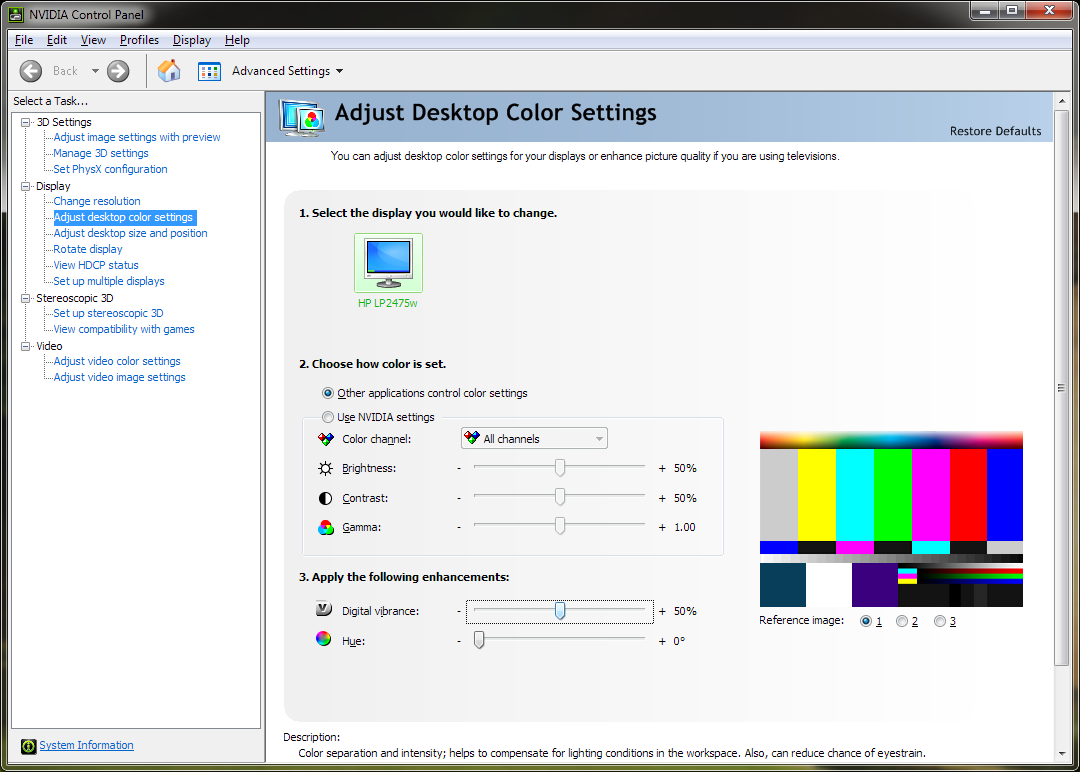 After a recent power dip, I had to reboot my machine and the colours went completely crazy. I have an HP 2475w wide-gamut monitor which can produce some seriously "dayglo" colours - e.g. the orange in the Firefox icon became an eye-searing hypersaturated red. Since my PC is on 24/7 for long intervals at a time, it was absolutely impossible to tell what had caused this. I had been evaluating some new raw converters recently so my initial guess was that some software I installed had made the change. After much frustration, uninstalling apps, and several reboots later, it turns out that the culprit is the latest NVIDIA drivers which default the "digital vibrance" setting to 90% (where it had previously been 50%).
WTF, NVIDIA? Please don't screw with my colours and focus on building better hardware instead. Secondly, how did this update get WHQL approval and made it into Microsoft's Windows Update? It's little things like this that have made all the pros move to Mac.
Developers, developers, developers
Yes, what else, I'm referring to the infamous Steve Ballmer going crazy on stage scene. Bruce Eckel recently wrote in a blog post:
He's right, developers are important. And if you only go to Microsoft conferences, it looks like all developers are using Windows. But if you go to any other developer conference, everyone is using Macs.
Which got me thinking, WTF is up with the Windows command prompt? If there's one thing developers need, it's a solid command line interface which lets them manipulate OS primitives with the minimum of fuss. So why do I find myself installing Cygwin and puttycyg on every Windows machine that I need to get some work done with? Maybe I'm just a *nix die-hard who's too stubborn to learn something new but it works great, for the most part (what's wrong is the subject of another rant altogether).
Some will probably say that PowerShell is meant to be the answer but I disagree. It may be nice for scripted rolling out of patches and performing other sysadmin-type tasks en masse but c'mon, who wants to use that as their shell? Even if you were willing to dig deeper and learn the arcane syntax, you're still stuck in the same old DOS box "terminal" that the regular cmd.exe runs in. Even trivial operations like resizing the window or copy & paste are a misson. A Google search for "Those who don't understand UNIX are condemned to reinvent it, poorly" returns a similar rant about PowerShell as one of the top results so clearly I'm not the only one frustrated by it. It all sounds very good on paper what with the pipes on steroids and .NET integration but it somehow fails to provide a shell replacement.
Are all Windows developers hopelessly stuck somewhere deep inside the Visual Studio GUI? (The ones that haven't migrated to the Mac yet, anyway?)
Vista and file deletion
I've been running Windows Vista for about a year and a half (my desktop hasn't been reinstalled once), and find it to be great. But every once in a while I still encounter the ridiculously slow performance issue where file operations take forever - even simply browsing into a folder with Explorer. Here is an example of a folder deletion of a small source project with a bunch of Git history in it that Windows has been busy deleting for a good half an hour now:

A whole bunch of fixes were supposed to have been included in SP1 but it seems like some problems still remain 
UPDATE: it's something to do with the folder being shared - and unsharing takes extremely long, while keeping the hard drive very busy. Possibly some kind of dodgy recursive file system metadata update? Deleting from the command line with "rmdir /s" solved the problem in the end.
Random rants
- Is the SOAP Stack an Embarrassing Failure? (Or should that be "Java's SOAP Stack" rather?) Axis 2, um, "leads the pack" in that regard. WS-* not complicated enough for you? Let's reinvent the app server wheel while we're at it too. If you have to do Web Services in Java, I recommend you check out Spring Web Services.
- Enabling Media Sharing in Vista doesn't unblock the Windows Firewall ports it uses. A while ago I got this to work with my Xbox 360 (though it was much slower and never worked with video compared to the free, 3rd party app TVersity). Then one day it decided to stop working. Turns out that Windows Firewall decided to block it for no apparent reason. This despite me re-enabling Media Sharing several times afterwards. @#$%! And this, kids, is why Apple is winning this round.
- Badly implemented Ajax is worse than no Ajax. We survived for many years without dynamic web pages but now everyone feels the need to Web 2.0-ify their online presence. Looking at you, Good Reads. Rendering badly in Firefox is not hip in this day and age

P.S. Don't you just hate it when they put footnotes at the end of a book?
Useful Reading for Game Developers
Established game studios' staff as well as would-be game developers should check out The 7 Commandments All Video Games Should Obey over at Cracked.com. Commandments #5 and #6 sum up everything that is wrong with Assassin's Creed, but it's #7 - be playable with real friends in the same room as you - that I wish more games paid attention to. Even among the few games that do offer split screen, too many manage to get it so horribly wrong it's worth asking why they bothered in the first place. Just look at the various G.R.A.W. and Rainbow 6: Vegas titles - Ubisoft devs should sit down and play Halo 3 and Gears of War end to end with a buddy to see where the bar is at.
Faaaaaaaaast Forward
Do you ever get the feeling that somebody's pushed the FFWD button of your life and not letting go? That is how I'm feeling this morning. And I can't even put my finger on why it is but in the back of my mind things are happening at a rapid rate. It's probably just a reflection of the busy modern-day lifestyle and it's probably even something that you could enjoy on occasion. But right now, all I want to do is pause for a sec. At least I haven't lost my sense of humor.